
Nationwide IT field service
Network Equipment
On-site hands for switches, routers, firewalls, and rack and stack, working alongside your network engineers and completed with clean documentation.
Last updated
What we do
Relion provides technicians for network equipment installs, replacements, and cutovers. Your engineers keep control of the design and configuration, and our technician is the trained set of hands at the site.
Technicians confirm power, mounting, and port assignments, connect to your scope, stay on the line during cutover when required, and document the finished rack.
Scope details
Network equipment visits are planned around a change window. Before dispatch we confirm the equipment list, whether devices arrive pre-configured, the port map, the cutover window, and who the remote engineer is. A technician who knows the plan in advance spends the window on the work instead of on discovery.
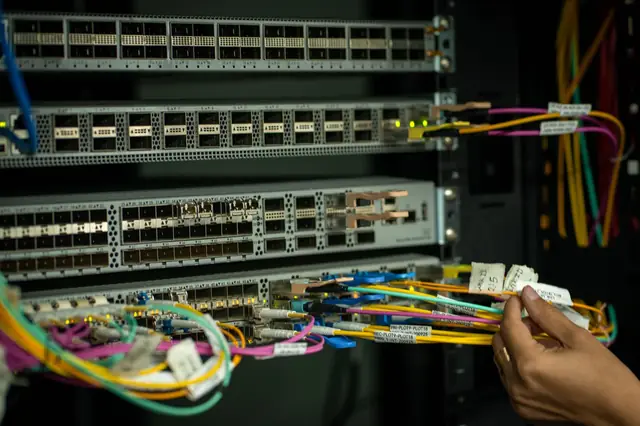
On site, technicians unbox and inspect hardware, rack it with the correct rails and power, connect console access for your engineer when needed, move cables to the new device by port map, and confirm link lights and connectivity with your team. Old devices are labeled, removed, and packed for return.
Typical jobs
- Switch, router, and firewall installation
- Rack and stack of network hardware
- Equipment swaps and refreshes
- Patching to a port map
- On-site support during cutovers
- Decommissioning and return prep for old gear
Common work order examples
- Replace a store's core switch during an overnight window, moving cables port by port from the old switch to the new one
- Install a new firewall and provide console access while a remote engineer applies the configuration
- Rack two switches and a patch panel in a new IDF and patch to the supplied port map
- Swap a failed router with a pre-configured spare and confirm the circuit comes up
- Inventory and photograph a network closet ahead of a refresh
Equipment we typically handle
- Access and core switches
- Routers and SD-WAN edge devices
- Firewalls and security appliances
- Modems and carrier hand-off equipment
- Uninterruptible power supplies and PDUs
- Racks, shelves, cable managers, and patch panels
Tools and testing
Equipment work depends on giving your engineer a reliable connection to the device. Technicians carry:
- Console cables and adapters (USB, serial, and RJ45)
- A laptop with terminal software for console sessions
- Cable tester and toner
- Rack screws, cage nuts, and mounting hardware
- A label printer for ports and devices
Deliverables
Closeout documents are delivered within 24 hours of the completed visit.
- Check-in and check-out times on the work order
- Before and after photos
- Signed work order
- Technician notes on what was done and what was found
- Photos of the finished rack and patching
- Serial numbers and port notes when your scope calls for them
Project work vs. break-fix
A refresh across many sites works best with a pilot location, a standard runbook, and waves scheduled by region and change window. We explain the approach in planning a multi-site network refresh and on IT Projects & Rollouts.
Break-fix calls are usually urgent: a failed switch, router, or firewall. The technician installs the replacement you ship, follows your engineer's steps to restore service, and documents what was replaced.
Frequently asked questions
Do you configure the equipment or just install it?
Most jobs use your pre-configured equipment or a remote engineer. Technicians follow the steps in your scope. If you need configuration work on site, include it in the work order so we can confirm it before dispatch.
Can a technician stay on a bridge call during cutover?
Yes. Include the call details and the cutover window in the work order and the technician will follow your engineer's direction on site.
What should we send before the visit?
Send the site address and contact, scheduled window, equipment list, port map or rack diagram, and your escalation contact.
Can technicians move cables port by port during a swap?
Yes. Send the port map, or have your engineer supply it on the call. Technicians label as they go and photograph the old and new device before and after the move.
What if the new device does not come online?
The technician stays on the call with your engineer for the troubleshooting steps in the scope. If the window closes, the rollback plan in the work order is followed and the result is documented.
Need Network Equipment on site?
Send your scope of work and we will confirm coverage, schedule, and rates. Closeout documentation follows every visit.